Kill annoying macOS
battery pop-ups.
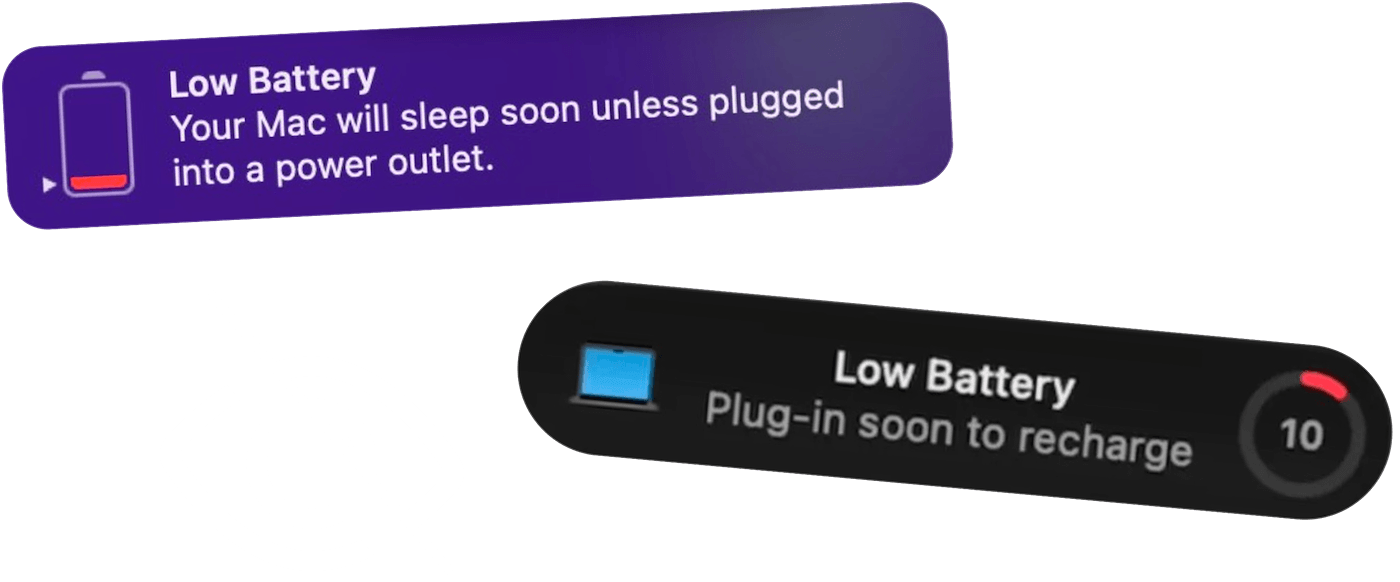
macOS Tahoe nags you every minute. macOS Sequoia makes you trek to the top-right corner to dismiss it. Juicy auto-dismisses both. No need to lift a finger.
Free 3-day trial • No credit card required
Free 3-day trial • No credit card required

Juicy is available for your MacOS
Get a download link reminder sent to your email when you are back in front of your computer:
We'll send you the download link. No spam.
macOS battery pop-ups
won't leave you alone
On macOS Tahoe, the native low-battery notification re-fires every minute until you manually dismiss it. On macOS Sequoia, the alert is persistent — it just sits there until you trek to the top-right corner and click it away. Either way: loud, distracting, covering your work. Juicy makes them vanish.
Without Juicy
- Tahoe: the pop-up re-fires every minute until you dismiss it manually.
- Sequoia: persistent alert that sits there until you trek up to the top-right corner to click it away.
- Your screen-share shows the whole team your "LOW BATTERY".
- You'd disable it system-wide — but then there's no warning at all.
With Juicy
- macOS pop-up appears and vanishes before you even see it.
- Juicy's own beautiful, non-intrusive pill takes its place.
- Screen-shares stay clean. No embarrassing system warnings.
- Still get warned at exactly the percentages you choose.
Silence, but smarter
Kill the noise, keep the signal
Dismisses the native pop-up automatically
The moment macOS fires its low-battery warning, Juicy clears it for you. No clicks, no screen-share embarrassment, no interruption.
Juicy's pill takes its place
Instead of an intrusive system modal, you get a beautiful, native-feeling notification pill — with screen glow and custom sound.
On/off toggle in one click
Want the native macOS pop-ups back? Flip it off in Settings. No system modifications, no terminal commands, no background daemons.
Still get the warning you need
Auto-dismiss doesn't mean silence — Juicy's own alerts still fire at your chosen thresholds, so you never miss a low battery.
Works during screen-shares
No more system pop-ups covering your Zoom, Meet, or Teams calls. Present with confidence knowing nothing will crash the frame.
Near-zero system impact
Juicy watches for the native alert and dismisses it in milliseconds. No polling, no heavy background task — just a quiet helper.
Purchased the app recently, GOOD STUFF to buy
"The app has a very clean and well-thought-out design, and it works flawlessly. Compared to other Mac battery apps, it performs exceptionally well. I'm really impressed and looking forward to seeing even more functional and beautiful design updates in the future. I'm definitely sticking with it!"
Silence the noise.
Once and for all.
A one-time payment. No more interruptions, unlocked for life.
Free Trial
3 days, full features
- Custom battery alerts at any %
- Battery health monitoring
- Lifecycle alerts & notifications
- No credit card required
Pro License
One-time payment
- Pay once, use forever
- One year of free updates
- Use on up to 2 Macs
- All Pro features unlocked
Optional renewal for another year of updates at $9.99 via the license manager once period ends
Juicy is available for your MacOS
Get a download link reminder sent to your email when you are back in front of your computer:
We'll send you the download link. No spam.
Lifetime License
One-time payment
- Lifetime updates, never renew
- Use on up to 2 Macs
- All Pro features unlocked
- Support indie development
Juicy is available for your MacOS
Get a download link reminder sent to your email when you are back in front of your computer:
We'll send you the download link. No spam.
14-day money-back guarantee.
If Juicy doesn't work for you, get a full refund.
Auto-dismiss
questions
Everything about silencing macOS's native battery pop-ups.
Why are macOS battery notifications so annoying in the first place?
It depends on your macOS version. On macOS Tahoe, the low-battery notification re-fires every minute until you manually dismiss it — constant interruption. On macOS Sequoia, the alert is persistent: it just sits on your screen until you trek up to the top-right corner and close it. Either way it covers your work, interrupts meetings, and shows up on screen-shares. Juicy auto-dismisses both and replaces them with its own non-intrusive alert.
Is auto-dismiss available on the Mac App Store version?
Unfortunately no — auto-dismiss requires capabilities outside Apple's App Sandbox. It's only available in the Direct and Setapp versions of Juicy. The Mac App Store version still gets Juicy's own beautiful alerts, just without the ability to suppress macOS's native ones.
Does this mean I won't get any low-battery warning at all?
The opposite. Juicy's own custom battery alerts fire at whatever percentages you choose — 20%, 15%, 5%, 3% — with a beautiful on-screen pill, optional screen glow, and custom sound. You stay warned; you just don't get nagged.
Can I turn auto-dismiss off if I change my mind?
Yes — it's a single toggle in Juicy's Settings. Turn it off and macOS's native pop-ups come back exactly as they were. Nothing to clean up, no system-level changes.
Does it modify or disable macOS system services?
No. Juicy doesn't touch any system files, services, or notification settings. It simply dismisses the macOS battery notification the moment it fires — the same thing you'd do with a click, just instant and automatic.
Does auto-dismiss affect other macOS notifications?
No — it's surgical. Juicy only dismisses the specific native low-battery notification. Every other macOS notification (Messages, Slack, Mail, Calendar, and so on) works exactly as normal.
Will auto-dismiss keep working across macOS updates?
We watch every macOS beta and update auto-dismiss to match Apple's latest notification changes. If Apple ever breaks it, we fix it — usually within days. Juicy ships new updates every few weeks.
Explore more Juicy features

Don't run
out of juice.
Smart battery alerts, health insights, and beautiful design — everything you need for your Mac's battery. Start your free 3-day trial today.
Juicy is available for your MacOS
Get a download link reminder sent to your email when you are back in front of your computer:
We'll send you the download link. No spam.
Free 3-day trial • No credit card required