Every device battery,
on one Mac.
AirPods, AirPods Pro, iPhone, iPad, Apple Watch, Magic Mouse, Keyboard, Trackpad, Beats — see every battery level in your menu bar and get per-device alerts when they're low or fully charged.
Free 3-day trial • No credit card required
Free 3-day trial • No credit card required

Juicy is available for your MacOS
Get a download link reminder sent to your email when you are back in front of your computer:
We'll send you the download link. No spam.
Stop juggling
five apps for five batteries
Your AirPods die mid-call. Your Magic Mouse stops tracking. Your iPhone is at 3% but you didn't notice until it was too late. Juicy puts every device battery in one place — and tells you before anything runs out.
Without Juicy
- AirPods die mid-meeting, with zero warning beforehand.
- Magic Mouse stops working — again. You never noticed the 3% warning.
- Five different battery widgets scattered across iPhone and Mac.
- You forget to charge the device you need most for that trip.
With Juicy
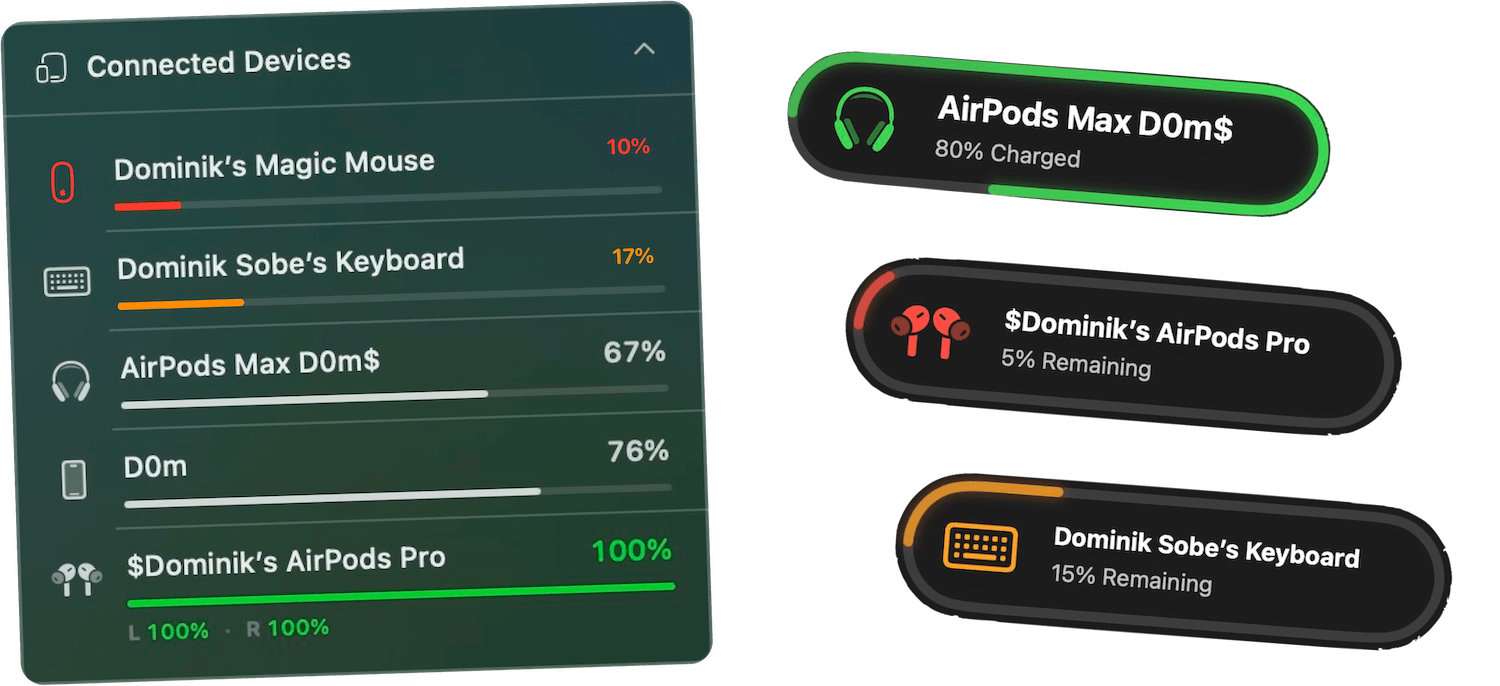
- AirPods at 15%? A beautiful pill pops up before the call ends.
- Every device battery sorted by urgency in your menu bar.
- Custom low and fully-charged alerts per device, per threshold.
- Left bud, right bud, case. All three, all tracked separately.
Works with everything Apple
The whole ecosystem, one menu bar

AirPods & AirPods Pro
Left, right & case

AirPods Max
Full battery state

Beats
Studio, Solo, Fit Pro

iPhone
Live over Bluetooth

iPad
Live over Bluetooth

Magic Mouse
All generations

Magic Keyboard
Touch ID & numeric

Magic Trackpad
Gen 1, 2 & 3
…and most other Bluetooth-enabled devices that report their battery level — Sony, Bose, Logitech and beyond.
Per-device control
Alerts that respect your ecosystem
Smart battery dashboard
Devices are ranked by battery level so the one that needs charging is always at the top. Color-coded progress bars show you the full picture at a glance.
Per-device low-battery alerts
Set a custom low-battery threshold for every device — 10% for AirPods, 20% for iPhone, whatever you prefer. Independent from your Mac's own alerts.
Fully-charged notifications
Get notified the moment your AirPods, iPhone, or Beats hit 100%. Unplug at the right moment to protect lithium-ion cells across every device.
Customize per device
Pick a different color, sound, notification position, and screen glow for each device. Your AirPods deserve the same drama as your MacBook.
Hide what you don't care about
Only want alerts for your AirPods and iPhone? Hide everything else in one click. The Devices tab lets you tune what's tracked and what's ignored.
Near-zero CPU impact
Smart duty-cycled scanning keeps Bluetooth radio and CPU usage near zero. Juicy watches every device without making your Mac sweat.
Purchased the app recently, GOOD STUFF to buy
"The app has a very clean and well-thought-out design, and it works flawlessly. Compared to other Mac battery apps, it performs exceptionally well. I'm really impressed and looking forward to seeing even more functional and beautiful design updates in the future. I'm definitely sticking with it!"
Every device.
One license.
A one-time payment. Battery alerts for every device, unlocked for life.
Free Trial
3 days, full features
- Custom battery alerts at any %
- Battery health monitoring
- Lifecycle alerts & notifications
- No credit card required
Pro License
One-time payment
- Pay once, use forever
- One year of free updates
- Use on up to 2 Macs
- All Pro features unlocked
Optional renewal for another year of updates at $9.99 via the license manager once period ends
Juicy is available for your MacOS
Get a download link reminder sent to your email when you are back in front of your computer:
We'll send you the download link. No spam.
Lifetime License
One-time payment
- Lifetime updates, never renew
- Use on up to 2 Macs
- All Pro features unlocked
- Support indie development
Juicy is available for your MacOS
Get a download link reminder sent to your email when you are back in front of your computer:
We'll send you the download link. No spam.
14-day money-back guarantee.
If Juicy doesn't work for you, get a full refund.
All-device alert
questions
Everything about tracking every device battery from your Mac.
Which devices does Juicy support?
AirPods (all generations, including left/right/case), AirPods Max, Beats headphones (Studio, Solo, Fit Pro and more), iPhone, iPad, Magic Mouse, Magic Keyboard (including Touch ID and numeric), Magic Trackpad, and of course your Mac. Most Bluetooth devices that report a battery level over the standard Apple protocols are supported.
How does Juicy compare to AirBuddy, coconutBattery, or iStat Menus?
Juicy pulls the best parts of each into one modern tool. Like AirBuddy, you get a menu bar dashboard for AirPods, AirPods Pro, iPhone, iPad, and Magic accessories — plus per-device alerts. Like coconutBattery, you get a full battery health tracker with cycle count and temperature. Like iStat Menus, everything lives in your menu bar — but purpose-built for battery, not a full system monitor. On top of all that, you get custom beautiful battery alerts for your MacBook with screen glow effects, custom sounds per event, and native-feeling notification pills — plus 80% lifecycle alerts and a themeable menu bar icon. One tool, one one-time payment, and we ship new features every few weeks.
Can I set different alert thresholds for each device?
Yes — that's the whole point. Set your AirPods to alert at 15%, your iPhone at 20%, your Magic Keyboard at 10%, and your Mac at 5%. Each device gets its own low-battery and fully-charged thresholds, colors, sounds, positions, and screen glow.
Do I need to keep my iPhone or iPad plugged in?
No. Juicy reads battery levels over Bluetooth from nearby devices — no cable needed. Your iPhone and iPad battery levels update live as long as they're nearby and paired to your Mac.
Does Juicy work with non-Apple Bluetooth devices?
Most Bluetooth headphones, mice, and keyboards that report battery level via the standard Bluetooth battery service (GATT) will appear in Juicy. Support varies by manufacturer — Beats, Sony, and Bose typically work well. If a device doesn't appear, it usually means the manufacturer doesn't expose its battery level.
Does tracking all these devices drain my Mac's battery?
No. Juicy uses smart duty-cycled scanning — it wakes the Bluetooth radio only briefly and in staggered intervals. CPU and battery impact are near zero, and you can tune scan frequency in the Devices tab if you want to go even lower.
Can I hide devices I don't care about?
Absolutely. The Devices tab in Settings lets you hide any device, rename it, or configure alerts individually. Perfect if you're not interested in tracking, say, your Magic Trackpad's battery alongside your AirPods.
Does the notification center keep piling up with battery pop-ups?
Not unless you want it to. Each alert can be set to auto-dismiss after a few seconds or stay persistent until you dismiss it — per device, per event. And Juicy can even auto-dismiss macOS's native battery pop-ups so your screen stays clean.
Explore more Juicy features

Don't run
out of juice.
Smart battery alerts, health insights, and beautiful design — everything you need for your Mac's battery. Start your free 3-day trial today.
Juicy is available for your MacOS
Get a download link reminder sent to your email when you are back in front of your computer:
We'll send you the download link. No spam.
Free 3-day trial • No credit card required